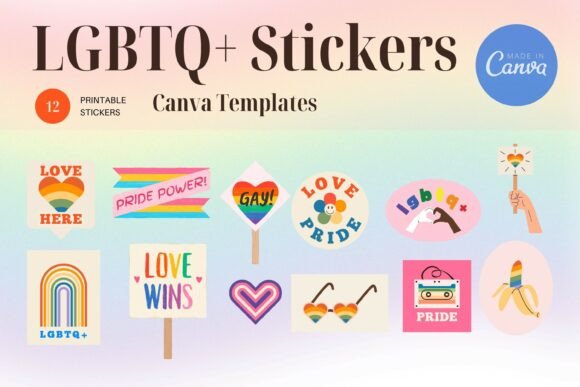
LGBTQ Sticker Bundle
The LGBTQ Sticker Bundle is a ready-to-use digital resource designed for creators, educators, marketers, and small business owners who want to express inclusion, support, and visibility—without starting from scratch. It’s not just decorative; it’s functional. Each sticker is crafted with intention—clean lines, thoughtful color palettes, and universally recognizable symbols—making them suitable for social media graphics, classroom materials, event signage, newsletter headers, or brand collateral. What sets this bundle apart is how it integrates into real-world workflows: it doesn’t live in isolation as static files but connects directly to Canva, where most users already design, iterate, and publish.
Once downloaded, you receive one ZIP file containing a single PDF. Inside that PDF is a direct link to a pre-built Canva template. This isn’t a collection of raw PNGs or SVGs—it’s a living, editable canvas. That distinction matters. You’re not just acquiring assets; you’re gaining access to a structured, layered, and customizable environment where layout, spacing, typography, and visual hierarchy have already been considered. That saves time during the execution phase—especially when deadlines are tight or consistency across multiple platforms is non-negotiable.
How It Fits Into Your Workflow
Think of the LGBTQ Sticker Bundle as a workflow accelerator—not a standalone tool. It works best when slotted into moments where speed, clarity, and authenticity converge. For example:
- Educators preparing Pride Month lesson plans can drop stickers into slide decks or printable handouts within minutes—no design background needed.
- Small business owners launching an inclusive campaign can layer stickers over product photos or use them as social media story accents—keeping tone aligned with values without outsourcing design.
- Bloggers and content creators building resource roundups or advocacy posts can embed stickers as visual anchors—making key messages more scannable and emotionally resonant.
- Nonprofit teams coordinating internal communications or external outreach can maintain brand cohesion by reusing the same sticker set across emails, reports, and presentations.
This isn’t about replacing strategy with decoration. It’s about reducing friction between intent and output—so your message lands faster, looks intentional, and reflects care in both content and presentation.
Using the Bundle in Canva: A Practical Walkthrough
You don’t need a paid Canva subscription to begin—but having one unlocks full flexibility. Here’s how to move smoothly from download to delivery:
- Download and open the PDF. No extra software required—just click the embedded link. It will redirect you straight to the Canva template in your browser.
- Log in to your Canva account. If you don’t have one yet, sign up—it’s free and takes under a minute. The template works identically for free and Pro users.
- Customize before exporting. Swap colors, adjust text, resize elements, or rearrange layout using Canva’s drag-and-drop interface. Most layers are grouped logically (e.g., “Sticker Group,” “Background,” “Text Block”), so edits stay focused and reversible.
- Export in JPG format. Once satisfied, click “Share” → “Download” → select JPG. This preserves transparency if your background is white or light—but if you need transparent backgrounds, PNG export is available with Canva Pro.
One important note: some decorative elements—like certain gradients, animations, or premium fonts—are marked as “Pro-only.” You’ll see a lock icon on those layers. You have two clean options: remove them entirely or replace them with free alternatives already in Canva’s library. Neither choice compromises the core functionality of the stickers themselves—they remain fully editable, scalable, and usable.
Compatibility and Integration With Other Tools
The LGBTQ Sticker Bundle doesn’t exist in a vacuum. It’s built to complement tools you already rely on:
- Google Workspace & Microsoft 365: Exported JPGs insert cleanly into Docs, Slides, or PowerPoint—no pixelation, no alignment surprises.
- Mailchimp, Substack, ConvertKit: Use stickers as inline image assets in email headers or section dividers to reinforce tone without bloating file size.
- Notion or Airtable: Paste exported stickers into dashboards or project trackers as visual status markers (e.g., “Inclusive Review Complete”) or team identity cues.
- Print-on-demand services: When preparing merch or physical resources, export at 300 DPI via Canva Pro—or scale up manually in free tools like Photopea if high-res print is needed.
This interoperability means the bundle supports consistency across digital and physical touchpoints—whether someone sees your sticker in an Instagram Story, a printed flyer at a community center, or a slide during a staff training session.
Long-Term Use and Quality Control
Because the bundle lives inside Canva, updates or revisions happen in place—not across scattered folders. You can save a master version to your Canva “Brand Kit” for instant reuse. That also helps with quality control: if your organization has accessibility guidelines (e.g., contrast ratios, alt-text standards), you can apply those checks once—and replicate them across every derivative graphic.
For teams, consider assigning one person to manage the master template. They handle font licensing verification, color palette alignment, and alt-text documentation—then share read-only links with collaborators. This avoids version sprawl while preserving creative autonomy.
Over time, you’ll notice patterns: which stickers get reused most? Which combinations resonate strongest with your audience? That observational data feeds back into future planning—helping you refine messaging, prioritize visuals, and even inform broader DEIB initiatives beyond design alone.
Getting Started Without Overcomplicating Things
If you're new to Canva or unsure where to begin, start small. Pick one use case—say, adding a subtle pride ribbon to your weekly newsletter banner. Open the template, delete everything except that one sticker, adjust its size and position, then export. That single action builds familiarity with the file structure and editing logic. From there, expand gradually: try layering two stickers, then three. Test contrast against different backgrounds. See how they hold up when scaled down for mobile previews.
No need to overhaul your entire visual system at once. Integration is iterative—not all-or-nothing. And because the bundle includes clear visual language (not abstract art), even minor tweaks retain meaning and impact.
Subscribe for updates—you’ll be the first to know when new variations launch (e.g., bilingual versions, disability-inclusive additions, or seasonal themes). These aren’t random drops; they’re responses to real user feedback and evolving cultural context. Each release is tested for usability, loaded into Canva with the same seamless link-based access, and documented with the same clarity.
Thank you for visiting—and for choosing tools that reflect your values in action, not just intention.