Daisy Flower Clipart Sublimation V.1
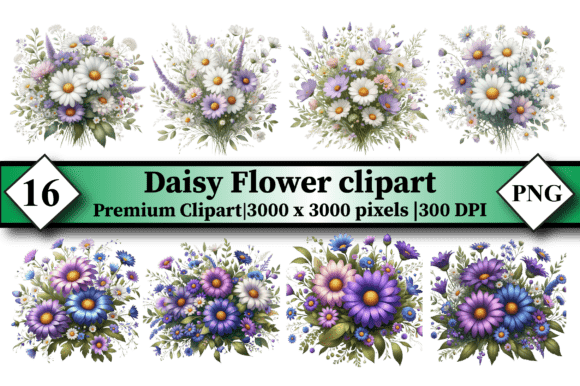
Floral design doesn’t have to mean scrolling endlessly for the “perfect” daisy — especially when Daisy Flower Clipart Sublimation V.1 delivers 16 ready-to-use, high-resolution PNG files in one clean, organized ZIP package. Each file is sized at 3000 x 3000 pixels and optimized at 300 DPI — meaning crisp, vibrant results whether you’re printing on ceramic mugs or sublimating onto polyester tote bags. No background, no guesswork: just transparent, print-ready daisies with clean edges and balanced proportions.
This isn’t generic clipart. These daisies were designed specifically for sublimation workflows — meaning they hold detail through heat transfer without pixelation, bleed, or color shift. The bundle includes variations in composition: some feature single blooms centered for symmetry, others show clusters with subtle stem movement, and a few incorporate light botanical accents like delicate leaves or soft petal overlays — all while maintaining consistent line weight and color neutrality (ideal for CMYK and RGB conversion).
Creative Flexibility, Not Just Decoration
What makes Daisy Flower Clipart Sublimation V.1 genuinely useful isn’t just its technical quality — it’s how easily it adapts to different creative goals and audiences.
- Small business owners can use the centered, minimalist daisies to brand seasonal collections — think “Spring Garden” mugs for a local café or “Fresh Start” notebooks for a wellness studio. Consistency across products becomes effortless when your core motif scales cleanly from 2-inch stickers to 12-inch wall pennants.
- Educators and camp coordinators often need cheerful, non-distracting visuals for handouts, classroom banners, or activity kits. The open, friendly shape of these daisies reads clearly even at small sizes — and because they’re PNGs with transparency, they layer smoothly over photos or textured backgrounds in Canva or PowerPoint.
- Hobbyists and crafters appreciate that each file stands alone but also works as part of a system. You might use one daisy for a leather wallet monogram, another rotated and resized for a hat patch, and a third layered with a handwritten quote for a desk mat. No need to trace, redraw, or wrestle with vector converters.
Practical Applications That Deliver Real Results
Sublimation thrives on precision — and this bundle supports that precision at every stage.
For T-shirts and apparel: Use the larger cluster designs on full-front prints, or scale down a single bloom for sleeve or pocket accents. Because the files are 3000 x 3000 pixels, you retain sharpness even when resizing to fit narrow areas like cuff bands or collar tags.
For mugs and drinkware: The centered compositions align naturally with cylindrical wrap zones. Test one daisy at 75% scale on a 11-oz mug mockup — you’ll notice how evenly the petals distribute around the curve without distortion. No stretching, no awkward cropping.
For stickers and decals: Transparency means clean cut lines for vinyl plotters or digital die-cutters. Pair a daisy with a short phrase (“Bloom Where You’re Planted”) in a simple sans-serif font — the contrast between organic shape and clean typography creates instant visual hierarchy.
For tote bags and desk mats: These surfaces benefit from repetition and rhythm. Try duplicating and rotating three different daisies from the bundle into a subtle, non-tiled pattern. Unlike seamless repeats, this approach feels handmade and intentional — ideal for boutique branding or teacher supply shops.
How to Keep Your Projects Clear, Cohesive, and Audience-Friendly
Even great assets can get lost in clutter. Here’s how to make the most of Daisy Flower Clipart Sublimation V.1 without overcomplicating things:
- Start with your audience’s context. A daisy on a yoga studio’s water bottle speaks calm and natural energy; the same daisy on a tech startup’s notebook signals simplicity and clarity. Let purpose guide placement, color adjustment, and pairing — not just preference.
- Limit color variation in early mockups. These files are grayscale-friendly and convert well to spot-color palettes. Try applying one flat Pantone shade (like PMS 284 for depth or PMS 123 for warmth) before adding gradients or shadows. It keeps production costs predictable and brand execution tight.
- Group by use case, not just file name. When unzipping your folder, create subfolders: “Apparel,” “Drinkware,” “Paper Goods.” Drag only the daisies you’ll actually use for that project into the working folder. It reduces decision fatigue and helps maintain visual consistency across deliverables.
- Test at real-world size before finalizing. Print a 3-inch version on plain paper and hold it next to your intended product — a mug handle, a wallet corner, a sticker sheet. Does the detail read? Is the balance right? This step catches scaling issues faster than any screen preview.
More Than Just a Design — A Starting Point
Daisy Flower Clipart Sublimation V.1 works because it respects your time and your intent. It doesn’t ask you to become a botanist or illustrator — it gives you a reliable, versatile foundation so you can focus on what matters: solving a problem, expressing an idea, or serving a customer.
You don’t need to reinvent floral design to make something meaningful. Sometimes the strongest statement comes from clarity — a single daisy, well-placed, with intention behind it. Whether you’re launching a new product line, updating classroom materials, or creating custom gifts for clients, these 16 files offer flexibility without friction.
And because it’s a digital download, there’s no waiting, no shipping delays, no inventory tracking — just immediate access and full commercial use rights. Unzip, open, apply, refine. That’s how practical creativity moves forward.
If you value clean execution, cross-format reliability, and designs built for real workflows — not just aesthetics — then this bundle earns its place in your active asset library. Keep it close. Use it often. And when you spot a new opportunity for a daisy — whether on a leather wallet or a wall pennant — you’ll already know exactly where to start.